
Dynamic Passgate 🔗
Invite-only server gate for Luanti (formerly Minetest) with dynamic per-user passwords.
New players get a templated password based on their username — share it privately to grant access. They must change it within a countdown timer to gain full privileges. Failure to comply results in a kick, and repeated failures lead to a permanent block.
How It Works 🔗
1. You invite a player and tell them: "Your password is <their-name>-wants-in"
2. They connect with that password — the mod auto-creates their account
3. They see a gate modal: "Change your password within 2 minutes"
4. They type: /password oldpassword newpassword
5. Password changed → verified → full privileges granted
6. If they don't comply → kicked → strike added → account purged
7. After 3 strikes → permanently blocked
The password template is fully configurable with variables, so you can use patterns like ${name}-${MMM}${yyyy} to create monthly rotating passwords.
Features 🔗
- Dynamic passwords — per-user passwords generated from a configurable template
- Template variables — username, dates, server name (see table below)
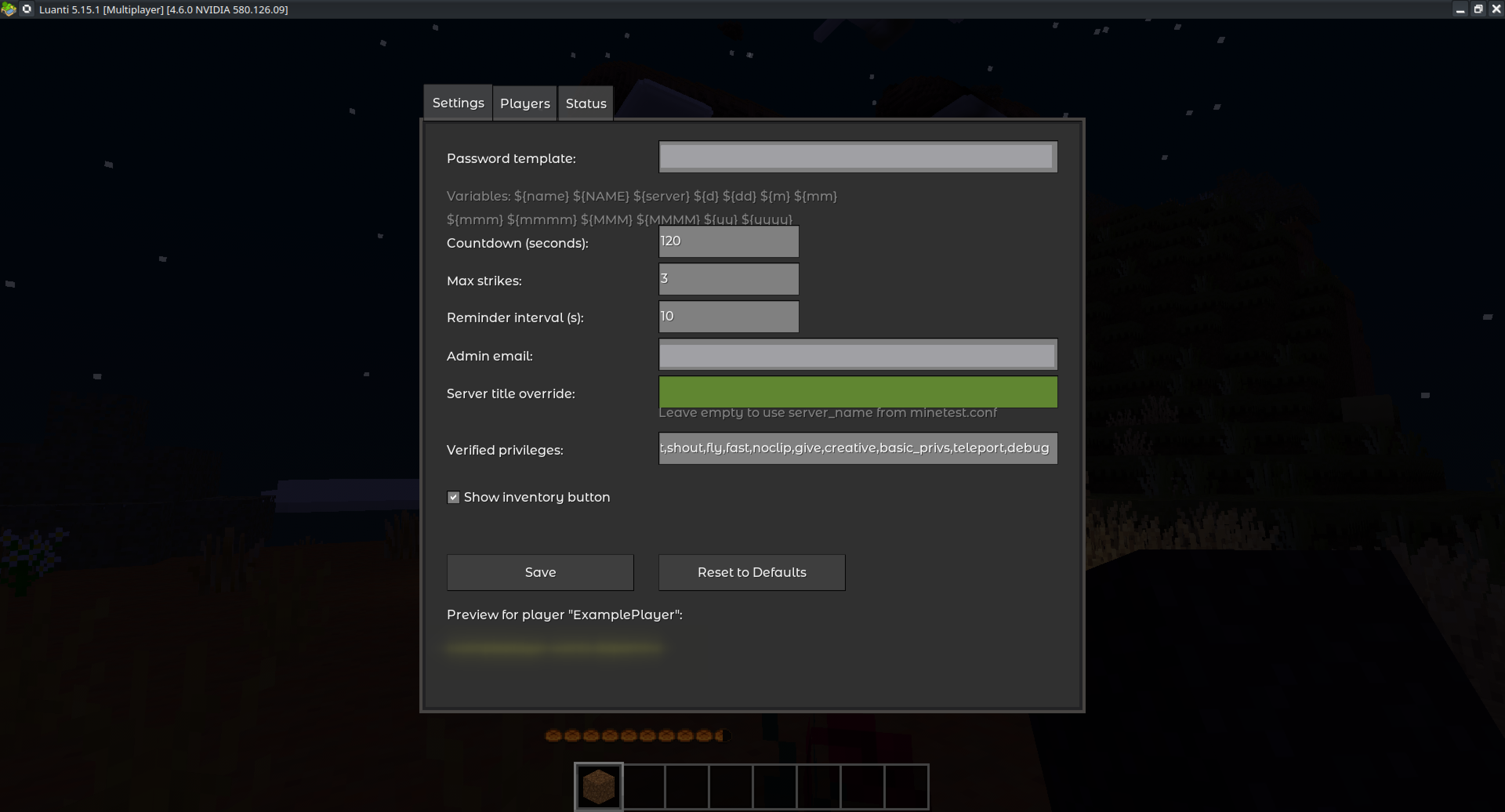
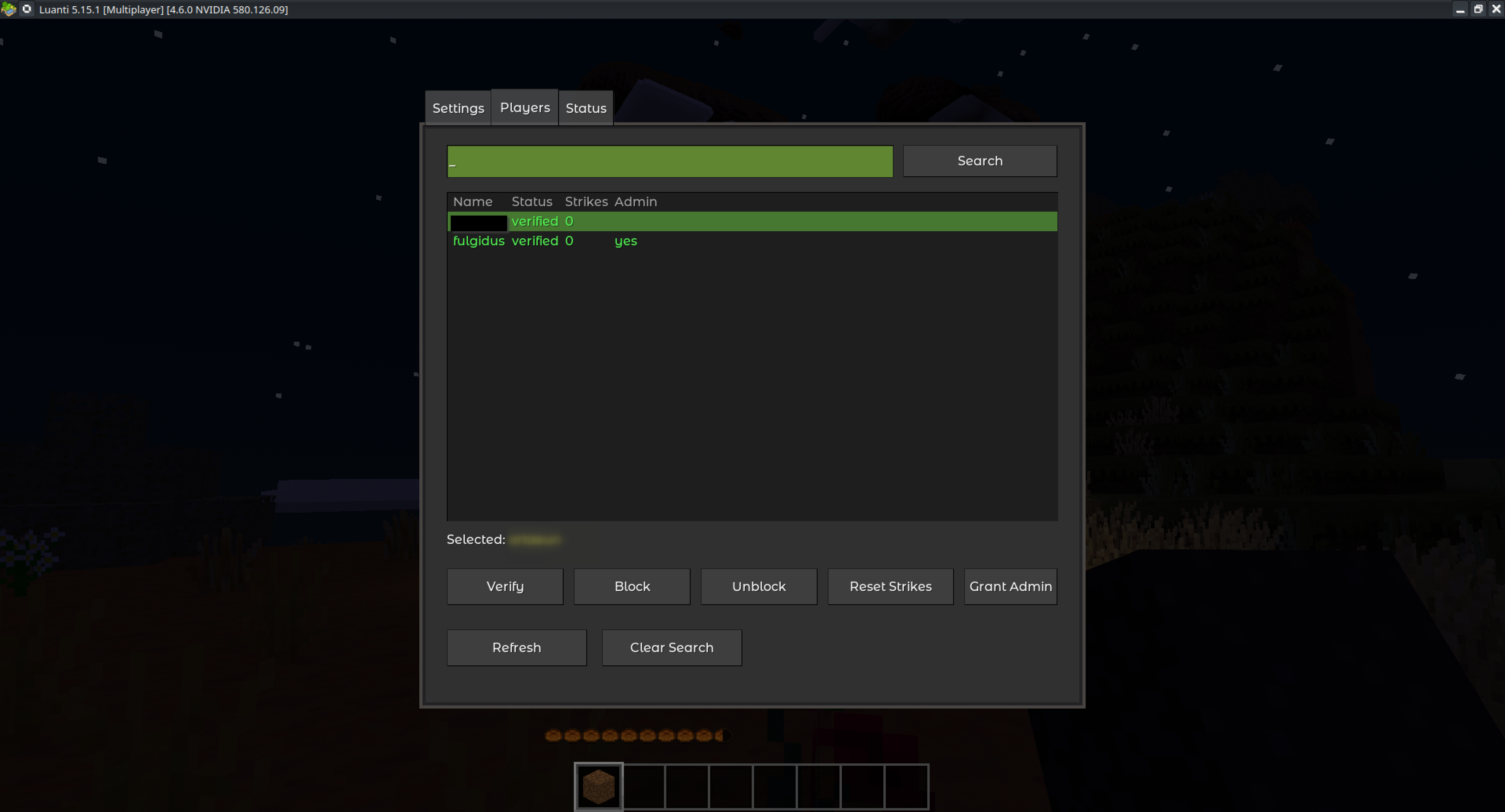
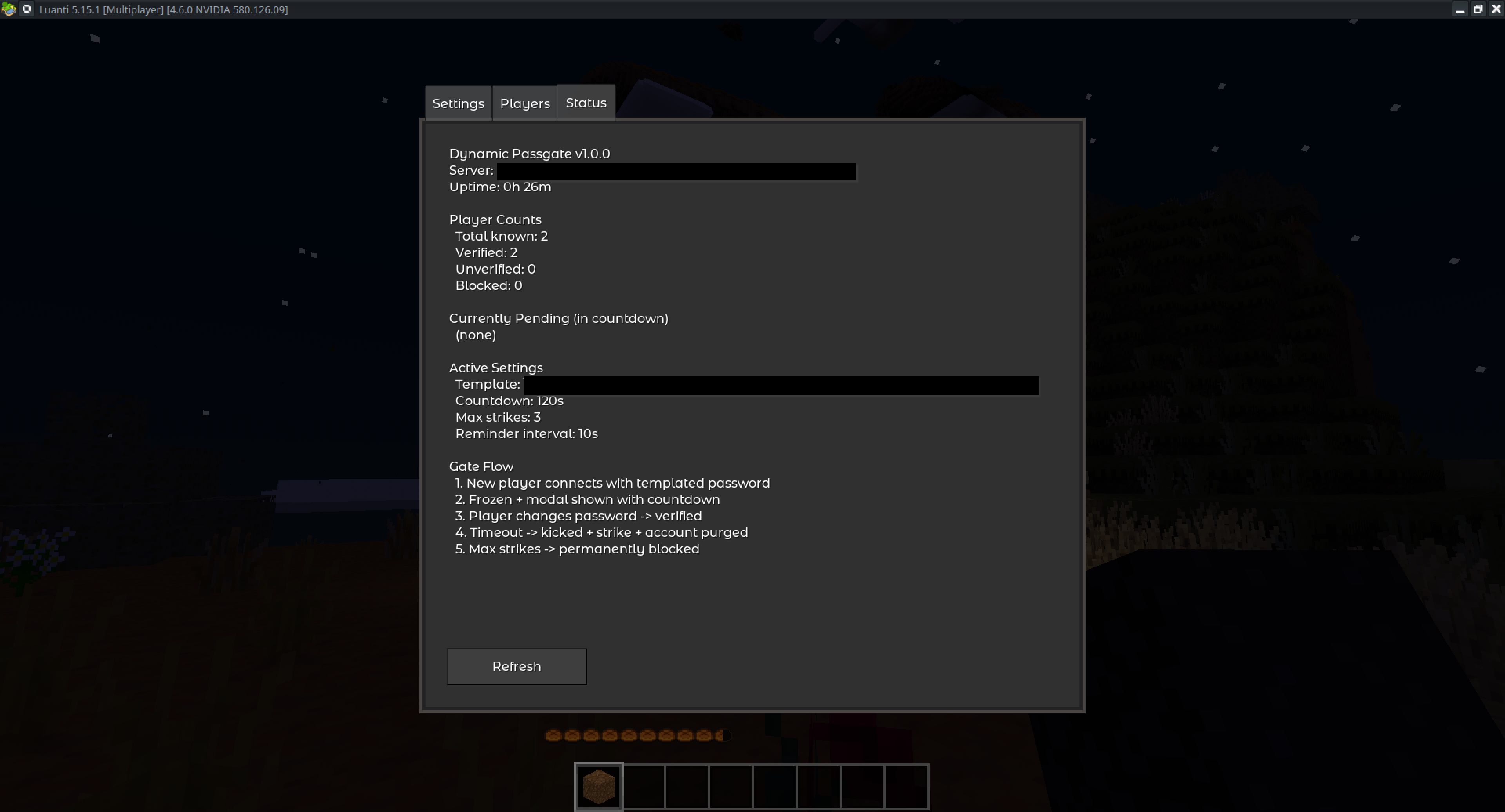
- In-game admin panel — manage settings, players, and view server status without editing config files or restarting
- Zero-config defaults — works out of the box, every setting has a sensible default
- Runtime configuration — all settings changeable via admin panel, no restart needed
- Delegated administration — custom
passgate_adminprivilege for non-admin gate managers - Server-side
/passwordfallback — works even when the client doesn't handle/passwordnatively - Strike system — configurable max strikes before permanent block
- Admin bypass — the server admin (from
minetest.conf) always passes through
Installation 🔗
- Copy the
dynamic_passgatefolder into your server'smods/directory - Enable the mod in your world's
world.mt:load_mod_dynamic_passgate = true - Restart the server
- (Optional) Configure settings via the in-game admin panel (
/gate) orminetest.conf
Template Variables 🔗
The password template supports the following variables:
| Variable | Description | Example (player "Steve", March 17, 2026) |
|---|---|---|
${name} |
Username (lowercase) | steve |
${NAME} |
Username (original case) | Steve |
${server} |
Server name | My Server |
${d} |
Day of month | 17 |
${dd} |
Day of month (zero-padded) | 17 |
${m} |
Month number | 3 |
${mm} |
Month number (zero-padded) | 03 |
${mmm} |
Month abbreviation (lowercase) | mar |
${mmmm} |
Month full name (lowercase) | march |
${MMM} |
Month abbreviation (capitalized) | Mar |
${MMMM} |
Month full name (capitalized) | March |
${yy} |
2-digit year | 26 |
${yyyy} |
4-digit year | 2026 |
Example Templates 🔗
| Template | Password for "Steve" (March 2026) |
|---|---|
${name}-wants-in |
steve-wants-in |
${name}-${MMM}${yyyy} |
steve-Mar2026 |
welcome-${name}-${mm}${yy} |
welcome-steve-0326 |
${server}-${name} |
My Server-steve |
Note: Date-based templates mean the password changes over time. Make sure to tell invitees the correct current password.
Settings 🔗
All settings can be changed at runtime via the admin panel (/gate) — no server restart required.
| Setting | Default | Description |
|---|---|---|
dynamic_passgate.password_template |
${name}-wants-in |
Password template with variable substitution |
dynamic_passgate.countdown_seconds |
120 |
Seconds before unverified player is kicked |
dynamic_passgate.max_strikes |
3 |
Strikes before permanent block |
dynamic_passgate.reminder_interval |
10 |
Seconds between chat reminders |
dynamic_passgate.admin_email |
(empty) | Contact shown in ban/kick messages |
dynamic_passgate.server_title |
(empty) | Override for server name in gate messages (uses server_name from minetest.conf if empty) |
dynamic_passgate.verified_privs |
interact,shout,fly,fast,noclip,give,creative,basic_privs,teleport,debug |
Privileges granted on verification |
dynamic_passgate.show_inventory_button |
true |
Show admin panel button in inventory |
Settings are read in this priority order:
- Admin panel (mod_storage) — highest priority, runtime-changeable
minetest.conf— initial configuration- Hardcoded defaults — always available as fallback
Admin Panel 🔗
Access the admin panel with the /gate chat command or the inventory button (if enabled). Requires server privilege or passgate_admin privilege.
Settings Tab 🔗
Configure all mod settings with a live preview of the password template.
Players Tab 🔗
View all known players with their status (verified/blocked/unverified) and strike count. Select a player to:
- Verify — manually verify and grant privileges
- Block — ban and purge account
- Unblock — remove ban and reset strikes
- Reset Strikes — reset strike count without unblocking
Status Tab 🔗
View server status, player counts, currently pending players (with countdown timers), active settings summary, and a quick reference of the gate flow.
Chat Commands 🔗
All admin commands require server or passgate_admin privilege.
| Command | Description |
|---|---|
/gate |
Open the admin panel |
/gate_verify <name> |
Manually verify a player |
/gate_block <name> [reason] |
Block a player (ban + purge account), with optional reason |
/gate_unblock <name> |
Unblock a player and reset strikes |
/gate_status <name> |
Check a player's gate status |
/password <old> <new> |
Change your own password (available to all players) |
Technical Notes 🔗
/passwordis client-side in Luanti — some clients handle it natively, others send it to the server as a chat command. This mod registers a server-side/passwordfallback to handle both cases.- Password change detection works by monkey-patching
auth_handler.set_passwordviacore.register_on_mods_loaded, since Luanti has noregister_on_password_changecallback. - mod_storage is used for all persistent data (settings, player status, strikes). Do not edit
mod_storage.sqlitedirectly — the engine caches it in memory. - The server admin (set via
nameinminetest.conf) always bypasses the gate automatically.
Compatibility 🔗
- Luanti 5.9.0+
- Works with any game (Minetest Game, Asuna, MineClone, etc.)
- No dependencies on other mods
License 🔗
CC BY-SA 4.0